PostgreSQL
Docker Compose
Using Docker Compose to launch your PostgreSQL database and supporting services is a straightforward process.
You need to specify a PostgreSQL image, define environment variables for your database credentials, volumes for persistent storage, and port mapping for external access.
For example:
services:

  serendipity-storage-service:
    container_name: serendipity-storage-service
    image: postgres:${SERENDIPITY_STORAGE_SERVICE_VERSION}
    restart: unless-stopped
    environment:
      POSTGRES_DB: ${SERENDIPITY_STORAGE_SERVICE_DB}
      POSTGRES_USER: ${SERENDIPITY_STORAGE_SERVICE_USER}
      POSTGRES_PASSWORD: ${SERENDIPITY_STORAGE_SERVICE_PASSWORD}
    env_file:
      - "${PWD}/.env"
    healthcheck:
      test: [ "CMD-SHELL", "pg_isready -U $${SERENDIPITY_STORAGE_SERVICE_USER} -d $${SERENDIPITY_STORAGE_SERVICE_DB}" ]
      interval: 5s
      timeout: 5s
      retries: 5
      start_period: 10s
    networks:
      - serendipity
    extra_hosts:
      - "host.docker.internal:host-gateway"
    volumes:
      - storage_service_data:/var/lib/postgresql/data
Secure data in transit
Enable TLS
Support for encrypted connections is enabled by setting the ssl parameter to on. The server will listen for both
normal and secure connections on the same port. Connecting clients can be required to use encrypted connections by
setting the environment variable PGSSLMODE to require.
PostgreSQL also requires access to the files containing the server certificate and private key.
For example:
services:

  serendipity-storage-service:
    container_name: serendipity-storage-service

    ...

    command: >
      -c ssl=on
      -c ssl_cert_file=/var/lib/postgresql/server.crt
      -c ssl_key_file=/var/lib/postgresql/server.key

    ...

    volumes:
      - '${PWD}/certs/serendipity.localhost-cert.pem:/var/lib/postgresql/server.crt'
      - '${PWD}/certs/serendipity.localhost-key.pem:/var/lib/postgresql/server.key'
      - storage_service_data:/var/lib/postgresql/data

    ...
Set the file permissions:
chmod 600 *.pem && \
xattr -c *.pem
On Unix and macOS systems the cert and key file permissions must disallow any access to world or group.
I also had an issue with Docker Compose mounting the *.pem files if they have extended attributes.
On macOS, the @ symbol at the end of a file's permissions means the file has extended attributes.
To remove them, run:
xattr -c *.pem
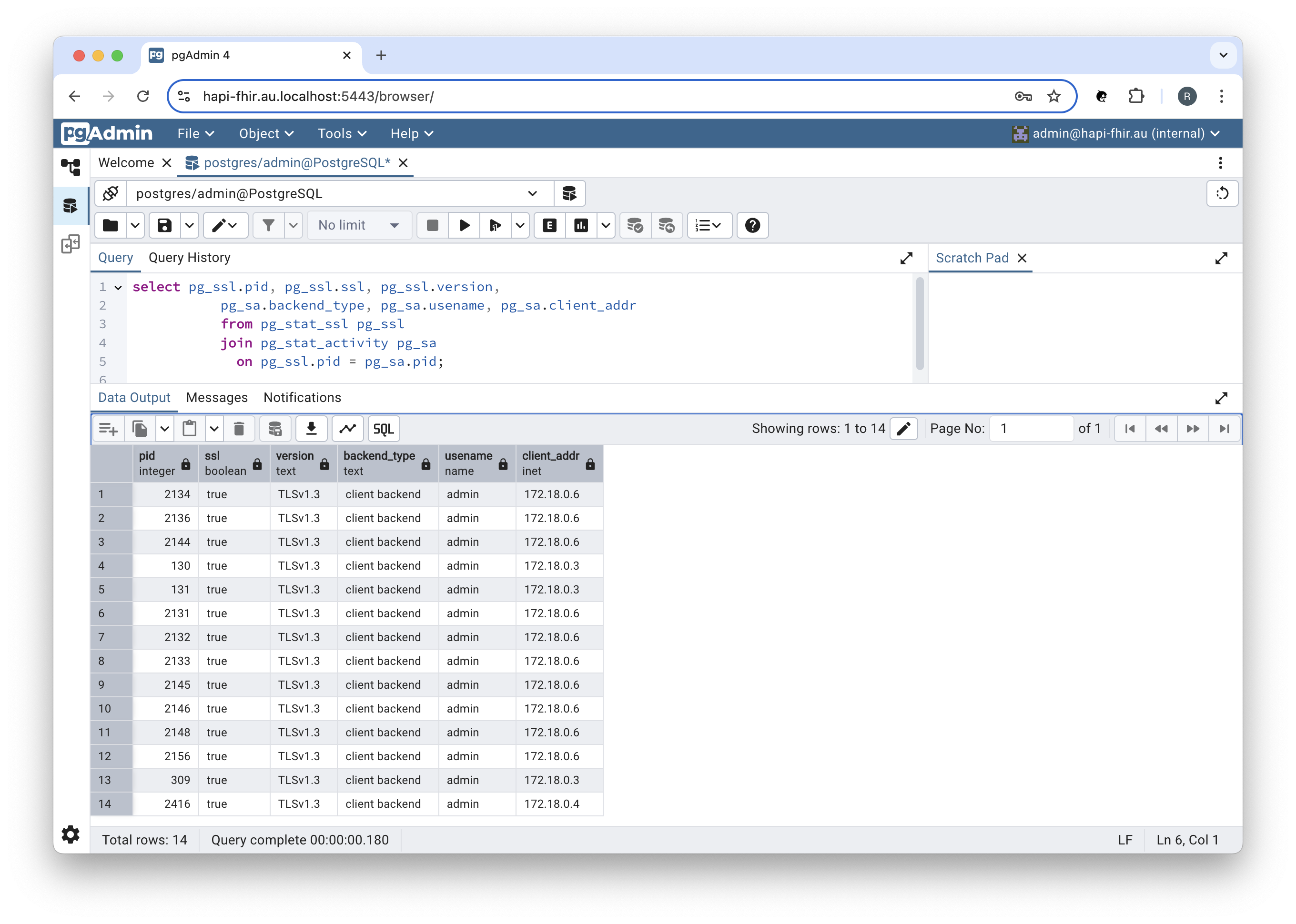
We can check that connections to PostgreSQL are secure by running the following query:
select pg_ssl.pid, pg_ssl.ssl, pg_ssl.version,
       pg_sa.backend_type, pg_sa.usename, pg_sa.client_addr
       from pg_stat_ssl pg_ssl
       join pg_stat_activity pg_sa
       on pg_ssl.pid = pg_sa.pid;
In pgAdmin:
We can obtain the Party Service's IP Address using the following command:
docker inspect -f '{{range .NetworkSettings.Networks}}{{.IPAddress}}{{end}}' serendipity-party-service
You should see something like:
172.18.0.6
Secure data at rest
Enable encryption
The Docker image of the Percona Distribution for PostgreSQL includes the pg_tde extension that provides data encryption.
  serendipity-storage-service:
    container_name: serendipity-storage-service
    image: percona/percona-distribution-postgresql:${SERENDIPITY_STORAGE_SERVICE_VERSION}

    ...

    environment:
      ENABLE_PG_TDE: 1

      ...
ENABLE_PG_TDE: 1 adds pg_tde to the shared_preload_libraries entry in the postgresql.conf file and enables the custom storage manager.
Connect to the container:
docker exec -it postgres bash
Start an interactive psql session:
psql -U admin -d hapi-fhir
Create the pg_tde extension in the database you want to encrypt:
\c hapi-fhir;
CREATE EXTENSION pg_tde;
Check the list of installed extensions:
hapi-fhir=# \dx
                 List of installed extensions
  Name   | Version |   Schema   |         Description
---------+---------+------------+------------------------------
 pg_tde  | 1.0-rc  | public     | pg_tde access method
 plpgsql | 1.0     | pg_catalog | PL/pgSQL procedural language
(2 rows)
Configure a key provider:
SELECT pg_tde_add_database_key_provider_file('file-vault', '/tmp/pg_tde_test_001_basic.per');
You should see something like:
 pg_tde_add_database_key_provider_file
---------------------------------------
                                     1
(1 row)
Note: This sample key provider configuration is meant for development and testing purposes only, not production.
Set a principal key:
SELECT pg_tde_set_key_using_database_key_provider('test-db-key', 'file-vault');
You should see something like:
 pg_tde_set_key_using_database_key_provider
--------------------------------------------

(1 row)
Alter a table to enable encryption:
ALTER TABLE hfj_resource SET ACCESS METHOD tde_heap;
You should see something like:
ALTER TABLE
Check to see if the table is encrypted:
select pg_tde_is_encrypted('hfj_resource');
You should see something like:
 pg_tde_is_encrypted
---------------------
 t
(1 row)
End your interactive psql session:
\q
References
Percona Distribution for PostgreSQL
- Percona Distribution for PostgreSQL docs: Docker
- Percona Community Forum: pg_tde
- GitHub: Percona PostgreSQL - Test Case 001